Quiet Hours, Symbols, and Alert Tuning
Goal: Turn a noisy alert into a short, high-signal stream you actually act on.
You need: One alert already created (see the main alert doc), and a few minutes to set the “Only when” filters, pick symbols, and set quiet hours.
An alert that fires on every squeeze is an alert you will mute within a week. The fix is not turning alerts off, it is narrowing what counts as worth a ping. This is a companion to how to set a squeeze alert: it does not repeat the setup steps, it covers the three knobs that control volume, the “Only when” filters, the symbol scope, and quiet hours.
What controls how much an alert fires?
Three things decide your volume, in order of impact:
- The “Only when” filters decide which triggers qualify at all.
- The symbol scope decides how many symbols are watched (your whole watchlist, the full board, or a hand-picked list).
- Quiet hours decide when a qualifying alert is allowed to reach you.
Tighten the filters first; they have the largest effect on volume.
The “Only when” filters
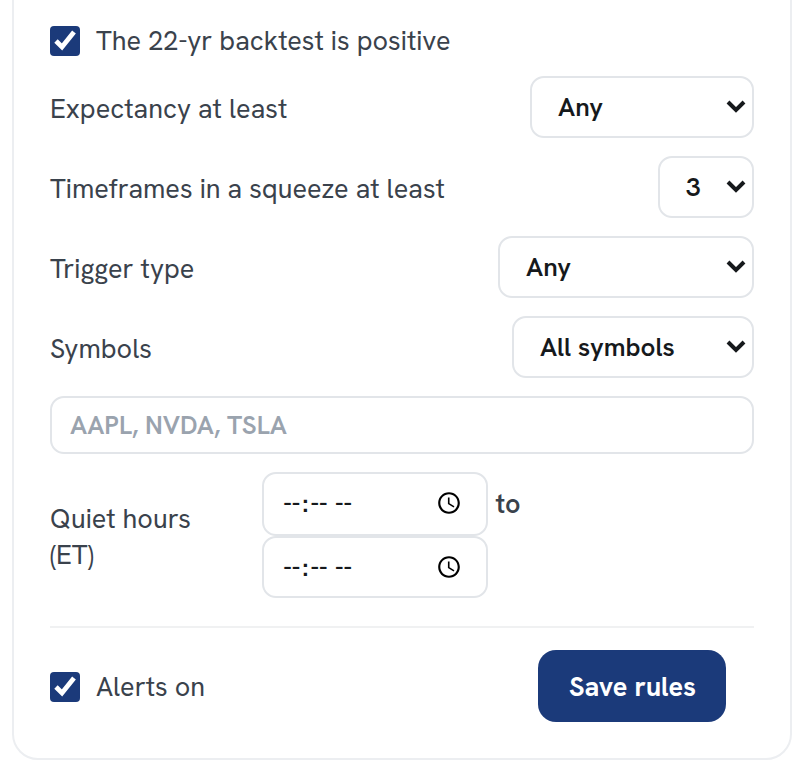
The conditions stack. A trigger has to clear every one you switch on, so each filter you add makes the alert quieter, not louder. Here is what each one does.
| Filter | What it requires | Use it to |
|---|---|---|
| Backtest positive | The symbol’s 22-year per-symbol record is profitable (positive expectancy) | Drop names that have never paid for this setup over 22 years |
| Expectancy at least | Per-trade expectancy meets a floor you set (for example +0.50%) | Keep only the higher-quality edges, not merely positive ones |
| Timeframes in a squeeze at least | At least N shown timeframes are compressed (the TFs column, e.g. 4/5) | Demand timeframe confluence, not a lone squeeze on one chart |
| Trigger type | Slingshot Squeeze only, Squeeze Signal only, or either | Match your style: reversal-from-below-zero vs continuation |
| Symbols | A specific list of tickers | Watch only the names you trade or already hold |
Two filters carry most of the weight. Backtest positive is the easiest noise cut you can make: in our backtest a bare squeeze entry won about 53.9%, no better than a random day at 53.7%, while the validated Slingshot Squeeze on the daily timeframe won 69.1% with +0.93% per trade across 5,852 trades. The difference is the per-symbol edge, so requiring it filters out exactly the triggers that historically went nowhere. Expectancy at least then lets you raise the bar from “positive” to “good.” Remember the edge is timeframe-dependent: daily Slingshot expectancy is +0.93%, the 4h is +0.56%, and the 15m is roughly -0.04%, so a high expectancy floor naturally pushes alerts toward the timeframes that actually paid.
How do trigger type and symbols change the mix?
Trigger type sets which kind of move triggers the alert. Slingshot Squeeze fires when momentum turns up from below zero while the squeeze is still on, with Edge Signal confirmation, a reversal entry. Squeeze Signal is a continuation, momentum already above zero and the compression tightens a tier. Note that only the daily Squeeze Signal is validated today; the intraday Squeeze Signal backtest is still in progress, so if you alert on Squeeze Signal, lean daily.
Symbols is the difference between a screener and a watchlist alert. Leave it empty and the alert watches everything that passes your other filters; fill it in and the alert only fires on the names you list. If you maintain lists in Watchlists, pointing an alert at one list is the simplest way to get “tell me when one of my names triggers” without any board-wide noise.
Quiet hours (ET)
Quiet hours suppress delivery during a window you set, in Eastern Time, the market’s clock. A qualifying trigger that lands inside the window is held back rather than pinged. The common setup is to silence everything outside the regular session and the first stretch of pre-market, so a daily trigger that resolves overnight does not buzz your phone at 3 a.m. Quiet hours change when you hear about an alert, never whether it qualified, so they are safe to use aggressively without losing signal.
Too many alerts vs too few
Tune in one direction at a time so you can see what each change did.
| Symptom | What to change |
|---|---|
| Too many alerts | Turn on Backtest positive; raise Expectancy at least; require more Timeframes in a squeeze; narrow Trigger type to one setup; scope to a symbol list; widen quiet hours |
| Too few alerts | Lower the expectancy floor; reduce the timeframes-in-a-squeeze minimum; set Trigger type to either; broaden the symbol scope; shrink quiet hours |
A practical daily-trader baseline: Trigger type set to Slingshot Squeeze, Backtest positive on, Expectancy at least +0.50%, Timeframes in a squeeze at least 3, scoped to your watchlist, with quiet hours covering overnight. That typically yields a handful of high-quality pings instead of dozens. If a week passes with no alerts, drop the expectancy floor before changing anything else; it is the setting that affects volume the most.
One honest caveat: even a well-tuned alert is selecting on a historical edge, not a guarantee. In our backtest one trade in three still lost, and these figures are before commissions and slippage. Filters raise your hit rate; they do not remove the losers.
Squeeze Setups is an educational research tool, not financial advice.
Related: How to set a squeeze alert, How to read the Squeeze Board, Watchlists